

Three Templates and a 20 Minute Method for a Time Blocking Schedule
Time blocking is the practice of assigning every important task a specific slot on your calendar instead of leaving it on an open-ended list. The fastest way to start is to skip the theory and schedule tomorrow right now: pick three to six blocks, write down what goes in each one, and adjust as you go. The templates and step-by-step method below make that first draft easy to build.
TL;DR:Time blocking should focus on scheduling your most critical tasks during your peak energy periods to maximize efficiency and prevent task expansion.Use a combination of templates, such as anchor days or the standard 9-to-5, and adapt them to your unique routine, tracking progress to refine estimates.Split longer tasks over 90 minutes into smaller sessions to maintain focus and reduce fatigue, ensuring sustained productivity where attention cycles naturally dip.Prioritize high-leverage tasks in your top focus periods, while scheduling routine or urgent items in shallow work or buffer blocks to protect your core focus time.Keep your schedule flexible by reserving buffer time after blocks to absorb overruns and only reschedule major disruptions or emergencies.
Freedom After 45Make Two Focused Hours CountFreedom After 45 offers a step-by-step 2-Hour Workflow blueprint for women over 45 seeking recurring income without traditional barriers.Explore the 2-Hour Workflow
Table of Contents
- What Is a Time Blocking Schedule?
- Time Blocking Templates You Can Copy Today
- How Do You Build a Time Blocking Schedule Step by Step?
- Which Time Blocking Method Fits Your Work Style?
- What Tools Actually Make Time Blocking Stick?
- Fixing the Schedule When It Breaks
- A 2-Hour Version of Time Blocking
- How Do You Handle Interruptions Inside a Time Block?
- How Should You Prioritize Tasks Before Blocking Time?
- Can You Stay Flexible Without Abandoning the Schedule?
- A Small Experiment Worth Trying Tonight
- Want Time Blocking Built Into a Full System?
- Sources
- FAQ
What Is a Time Blocking Schedule?
A time blocking schedule turns your task list into a calendar. Instead of writing “finish report” and hoping you get to it, you assign it a specific window, say 9:00 to 10:30 AM, and treat that window the way you’d treat a meeting. Nobody double books a meeting. The same rule now applies to your own work.
This is fundamentally different from a to-do list, which only tells you what needs doing, never when. A to-do list with fifteen items gives your brain fifteen open decisions to make throughout the day, and every one of those decisions costs you a little mental energy. A calendar with fifteen items already assigned removes the decision. You just look at the clock and do the next thing.
That difference matters more than it sounds. Assigning tasks explicit time slots rather than leaving them on an open-ended list reduces context switching and supports sustained focus, because your brain isn’t constantly scanning an unordered list trying to decide what’s next or worrying about what you’re not doing.
Two behavioral quirks explain why time blocking works so well for people who’ve tried everything else. The first is Parkinson’s Law: work tends to expand to fill the time available for it. Give yourself all day for a task and it’ll take all day. Give it a 45-minute block and it often gets done in 45 minutes. The second is the planning fallacy, our well-documented tendency to underestimate how long things take38002-1), even when we’ve done the exact same task before. Time blocking forces both problems into the open, because a block has a start and an end you can see.
Time Blocking Templates You Can Copy Today
You don’t need special software to start. A blank calendar and a pen will do. Below are three daily formats, a weekly structure, and a simple fill-in template you can adapt to your own routine.
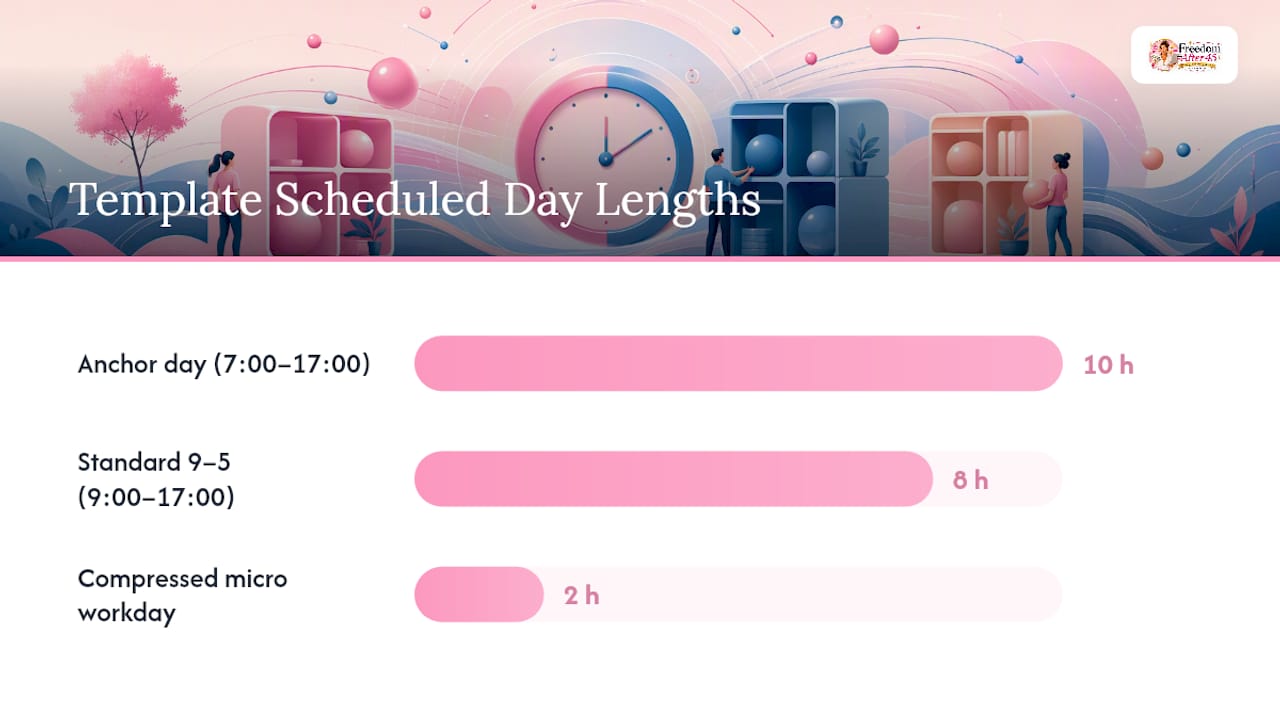
The anchor day works well if your schedule is unpredictable. Pick two or three non-negotiable anchor blocks, say, a morning deep work session and an afternoon admin block, and let everything else flex around them.
- 7:00–8:00 AM: Morning routine and priority review
- 8:00–9:30 AM: Anchor block 1 (deep work, most important task)
- 9:30–10:00 AM: Buffer and email triage
- 10:00 AM–12:00 PM: Flexible block for meetings or errands
- 12:00–1:00 PM: Lunch and reset
- 1:00–2:30 PM: Anchor block 2 (second priority task)
- 2:30–5:00 PM: Flexible block, admin, or catch-up
The standard 9-to-5 suits people with a traditional office schedule and fixed meeting hours.
- 9:00–9:30 AM: Plan the day, review priorities
- 9:30–11:00 AM: Deep work block 1
- 11:00–11:15 AM: Break
- 11:15 AM–12:30 PM: Deep work block 2 or meetings
- 12:30–1:30 PM: Lunch
- 1:30–3:00 PM: Meetings and collaborative work
- 3:00–4:30 PM: Shallow work (email, admin, follow-ups)
- 4:30–5:00 PM: Review and plan tomorrow
The compressed two-hour micro workday fits anyone squeezing focused work into a narrow window around other commitments.
- Minute 0–10: Quick priority check, pick one outcome for the session
- Minute 10–70: Single deep work block, one task only
- Minute 70–80: Short break, stand up, stretch
- Minute 80–110: Second focused block, related task
- Minute 110–120: Log what got done and what carries over
For a weekly view, day theming works well alongside blocking: Monday for planning and outreach, Tuesday and Wednesday for deep project work, Thursday for meetings, Friday for review and admin. Layer time blocks inside each themed day rather than replacing one system with the other. A monthly view can stay simple: mark fixed deadlines and recurring commitments first, then build weekly themes around the gaps.
For your own fill-in template, track five fields for every block: the day and time window, the priority task, an estimated duration, a buffer percentage, and a maximum block length. Color coding helps at a glance, blue for deep work, yellow for meetings, gray for admin, and a fifth color reserved for buffer or white space. Overflow tasks that don’t fit get flagged rather than silently dropped, which keeps high-priority work protected when a day runs long.
How Do You Build a Time Blocking Schedule Step by Step?
Building your first schedule takes about twenty minutes once you know the sequence. Here’s the process, done the night before.
- Brain dump everything. Write down every task on your mind, work and personal, without sorting or judging. Get it all out of your head and onto paper or a notes app.
- Estimate each task, then pad it. Guess how long each task will realistically take, then multiply that number by 1.25 to 1.5. This buffer directly counters the planning fallacy; if you think something takes an hour, block 75 to 90 minutes.
- Classify each item as deep, shallow, or buffer. Deep work needs concentration and produces your most valuable output. Shallow work is email, scheduling, and routine admin. Buffer is unassigned recovery time. Most days need all three.
- Pin your fixed events first. Meetings, appointments, and anything with a set time go on the calendar before anything else. These are the walls you build everything else around.
- Place deep work in your peak hours. Most people have one or two windows a day when focus comes easiest, often mid-morning. Protect that window for your hardest task, not your inbox.
- Review that night and adjust tomorrow. A two-minute check at the end of the day tells you which estimates were off and which blocks got interrupted, so tomorrow’s version improves.
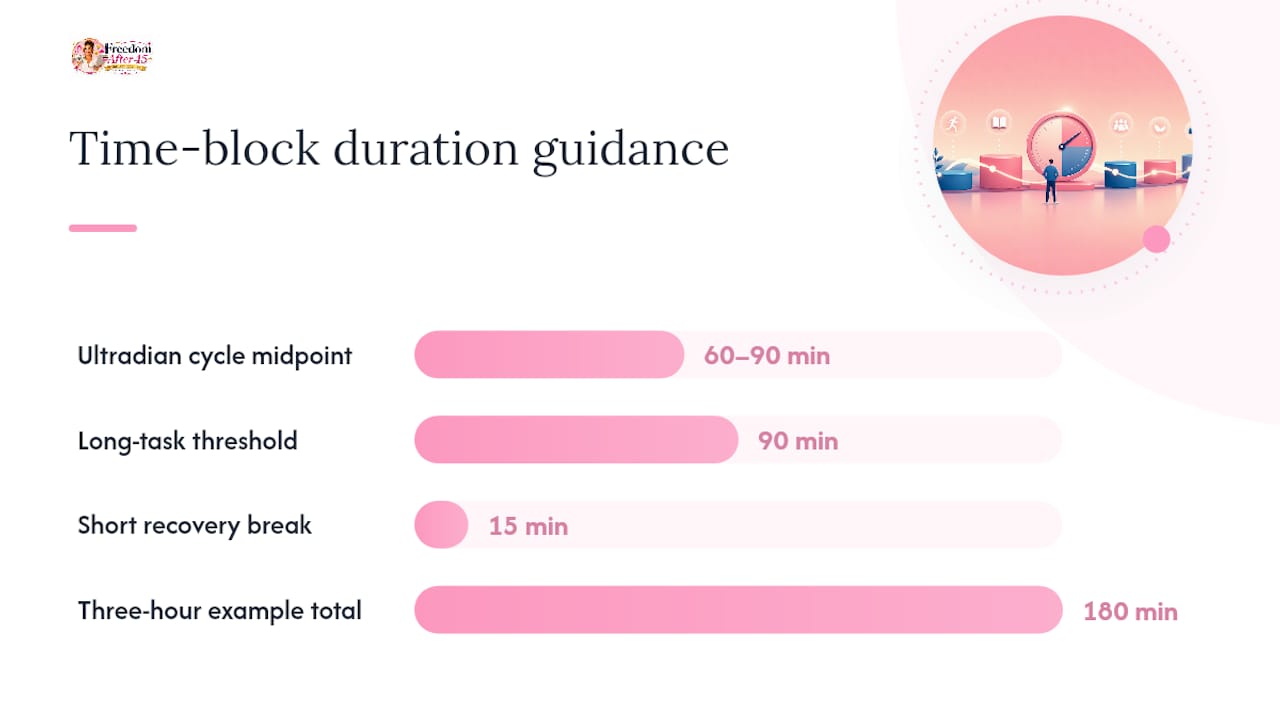
Long tasks deserve special handling. Anything estimated at longer than 90 minutes should get split into two blocks with a short recovery break between them, since sustained focus tends to follow ultradian cycles of roughly 60 to 90 minutes before attention naturally drops off. A three-hour writing project becomes two 75-minute blocks with a 15-minute walk in between, not one long grind that falls apart at the two-hour mark.
Pro Tip: Run a three-day trial before committing to a full week. Keep a two-minute end-of-day log with two columns: what you estimated and what actually happened. By day three, your estimates will already be noticeably more accurate, because you’re correcting against real data instead of guessing.
Which Time Blocking Method Fits Your Work Style?
Time blocking isn’t one rigid system. It’s a family of related methods, and picking the right variant (or combination) makes the difference between a schedule you keep and one you abandon by Thursday.
- Task batching groups similar small tasks into one block, answering all emails at once instead of checking your inbox forty times a day. This directly addresses the fact that multitasking and constant switching between task types carries a measurable performance cost.
- Timeboxing sets a hard time limit on a task regardless of whether it feels finished, leaning on Parkinson’s Law to force decisions instead of endless polishing.
- Day theming assigns a broad category to each day of the week rather than each hour, useful for people juggling several distinct projects or roles.
- 90-minute deep work blocks follow the ultradian rhythm research directly and suit anyone doing writing, coding, analysis, or other concentration-heavy work.
These methods combine well. A common pairing is theming your week by project, then time blocking each themed day into 90-minute deep work sessions with timeboxed shallow work in between. If Tuesday is your “client work” day, you might block two 90-minute sessions for deliverables and timebox a strict 30 minutes for client emails at the end.
To find what fits, run a one-week experiment with a single metric. Pick one thing to measure, blocks completed as planned, or tasks finished without rollover, and try one method for five working days before switching. Signs a method fits: you’re finishing blocks close to on time, you feel less scattered by 3 PM, and you’re not constantly renegotiating your own calendar. Signs it doesn’t: you’re canceling blocks daily, ignoring the plan by 10 AM, or feeling more anxious about the schedule than you did without one.
What Tools Actually Make Time Blocking Stick?
A digital calendar, Google Calendar, Apple Calendar, or Outlook, beats a paper planner for one simple reason: recurring blocks. Set your Tuesday deep work session once with a repeat rule, and it appears every week without you rebuilding it. That alone removes the biggest reason people quit time blocking, which is the friction of re-planning from scratch each morning.
If you prefer planning on paper or in a template first, that’s fine, but copy the finished plan into calendar events before the day starts. A plan that lives only in a notebook doesn’t send you a notification when a block starts, and notifications are what actually pull you out of your inbox and into the next task.
Set one notification rule and stick to it: a five-minute warning before each block, not fifteen alerts throughout the day. Color coding your calendar categories, one color for deep work, another for meetings, a third for personal, makes your whole week readable at a glance without reading a single label.
Lightweight planner apps add real value if you’re managing recurring templates across multiple days or want built-in buffer and overflow tracking. They add unnecessary overhead if you’re just trying to protect two hours of focus time. Start with your existing calendar. Add a dedicated app only once you’ve outgrown what a simple recurring event can do.
Fixing the Schedule When It Breaks
Every time blocking schedule breaks sometimes. The fix isn’t a better schedule. It’s a faster recovery.
- No buffer between blocks? Add 15 to 30 minutes of unassigned time after any block prone to running long, meetings especially.
- Too many long blocks in a row? Split anything over 90 minutes into two sessions with a short break, matching natural focus cycles.
- Zero white space anywhere on the calendar? Aim for 70 to 85 percent utilization, not 100. Deliberate slack absorbs overruns without knocking every later block off schedule.
When one block runs over, don’t cascade the delay through the rest of the day. Reschedule only the next one or two items and let lower-priority blocks slide to tomorrow’s brain dump instead of forcing everything to shift.
Track two numbers daily: percentage of blocks completed as planned, and total unplanned interruption time. Both take ten seconds to log and tell you within a week whether your schedule needs looser buffers or tighter focus.
Pro Tip: If you’re rescheduling more than two blocks a day, your estimates need bigger buffers, not more willpower. That’s a planning problem, not a discipline problem.
A 2-Hour Version of Time Blocking
If you’re working with a narrow daily window, the same rules scale down. Two focused hours typically split into two 50 to 55 minute blocks with a short break between them, one for the highest-value task of the day, one for the follow-up work that task creates.
Place that window during your natural energy peak, whenever that falls for you, rather than wherever it happens to fit around everything else. Freedom After 45 built its 2-Hour Workflow blueprint around exactly this structure: two defended hours, split into two blocks, tested for three days before judging whether the plan needs adjusting.
To try it yourself: block Hour 1 for your single most important task, Hour 2 for direct follow-through, and log completion each of the three days.
How Do You Handle Interruptions Inside a Time Block?
The most common interruption isn’t a coworker. It’s your own phone. Put it in another room, or at minimum face down and on silent, during any deep work block. Visual notifications pull your attention even when the sound is off.
For people interruptions, a simple sign or closed door communicates more than any verbal request. If you work somewhere that makes physical signals impossible, a shared calendar marked “focus block” trains coworkers over a week or two to check availability before interrupting.
Not every interruption is avoidable, and treating your schedule as fragile makes every knock on the door feel like a crisis. Keep a small notepad next to you during blocks. When an unrelated thought or request pops up, write it down instead of acting on it, then address it in your next buffer window. This single habit prevents the most common failure mode: a five-minute interruption turning into a twenty-minute detour because you followed the new thought instead of parking it.
For digital interruptions specifically, close email and chat apps entirely rather than minimizing them. A minimized tab still shows a notification badge, and that badge is enough to break concentration even without opening it.
How Should You Prioritize Tasks Before Blocking Time?
Time blocking only works as well as the priorities you feed into it. Blocking a low-value task into your best focus hour wastes the exact advantage the method gives you.
Before you build tomorrow’s schedule, sort your brain dump into three tiers: what moves a real goal forward, what’s urgent but not important, and what could wait a week with no consequence. The first tier gets your peak-energy block. The second tier gets a shallow-work slot. The third tier either gets scheduled for next week or dropped from the list entirely.
A quick gut check helps here: if you could only complete one task tomorrow, which one would make the rest of the week easier? That task goes first. Everything else gets built around it, not the other way around.
Avoid the trap of prioritizing by urgency alone. An email that arrived an hour ago feels urgent but is rarely important. A project deadline three weeks out feels distant but is usually where your real leverage lives. Time blocking gives you the structure to protect time for the second category before the first category eats your whole day.
Can You Stay Flexible Without Abandoning the Schedule?
A time blocking schedule that never bends breaks the first time real life happens, a sick kid, a surprise call, a task that takes twice as long as planned. A schedule that bends for everything isn’t a schedule at all.
The balance point is treating your blocks as strong defaults, not contracts. Protect the anchor blocks, your one or two most important sessions each day, and let the shallow-work blocks absorb the shocks. If something disrupts your morning, move the deep work block to the afternoon rather than skipping it entirely.
Give yourself one clear rule for when flexibility is allowed: a true emergency or a fixed external deadline change qualifies. Feeling unmotivated on a Tuesday does not. That single rule keeps you from renegotiating the schedule every time discipline feels hard, while still leaving room for the days that genuinely go sideways. Deliberate scheduling, done this way, is also one of the better defenses against work quietly expanding to fill every open hour on your calendar.
A Small Experiment Worth Trying Tonight
You don’t need a perfect system. You need one that survives contact with a real Tuesday. Block tomorrow with three anchors, your top task, a follow-up task, and one recovery break, then attach a small reward to finishing all three, coffee from the good place, twenty minutes of a show, whatever actually motivates you.
Tiny, repeatable habits beat elaborate systems every time, because elaborate systems collapse the first time a day goes sideways and simple ones don’t. Pull one of the templates above, fill it in for tomorrow, and see what breaks. That’s the whole test.
— Freedom After 45
Want Time Blocking Built Into a Full System?
Everything above works whether you’re organizing a job, a household, or a side project, and none of it requires buying anything. If you want scheduling paired with a structured path toward a specific daily outcome, The 2-Hour Workflow is built around that idea: two defended, time-blocked hours guided by a step-by-step system instead of a blank calendar.

The 2-Hour Workflow landing page includes the full course, a downloadable blueprint you can adapt using the templates in this article, and access to a community of women over 45 working through the same system. It’s built for anyone who wants the scheduling structure above paired with clear direction on what goes in those two hours, rather than building that direction alone from scratch.
The templates in this article stay free to use whether or not you ever look at the program. If you want the guided version, check out the 2-Hour Workflow and see whether the structure fits how you already like to work.
Sources
- Behavioral-science literature on attention and task focus (DOI)
- Research on focus patterns and computer use (UCI)
- American Psychological Association: multitasking research summary
- Microsoft Work Trend Index analysis
FAQ
What Is an Example of a Time Blocking Schedule?
A simple example splits a workday into named blocks: 9:00 to 10:30 AM for deep work on your top priority, 10:30 to 11:00 AM for email, 11:00 AM to 12:30 PM for meetings, and 1:30 to 3:00 PM for a second deep work session. Each block names one task or task type instead of leaving the hour open-ended.
What Is the Time Blocking Method With 5 Blocks?
There’s no single official “5-block method,” but a common five-block structure covers a full workday: one morning deep work block, a shallow-work block for email and admin, a midday meeting block, an afternoon deep work block, and a review block at day’s end. The exact number of blocks matters less than making sure each one has a clear, single purpose.
Should You Schedule Your Work Into Blocks?
Yes, for most tasks that need real focus. Assigning tasks to explicit time slots reduces context switching and supports sustained attention compared to working from an open-ended list, though very reactive roles may need a hybrid approach with wider flexible windows built in.
How Many Time Blocks Should You Have per Day?
Most effective schedules use four to eight blocks a day, mixing deep work, shallow work, meetings, and buffer time. Fewer than four often means blocks are too broad to guide real decisions, while more than eight tends to fragment the day and reintroduce the constant switching that time blocking is meant to prevent.
Does Freedom After 45’s 2-Hour Workflow Include a Schedule Template?
Yes. The 2-Hour Workflow blueprint packages a scheduling structure for two focused daily hours alongside the step-by-step course and community access. Current pricing is listed on the site.