

Sell Digital Downloads in 30 Days: Even With No Audience
If you have zero audience, start on a marketplace to borrow its traffic; if you already have followers or an email list, build a store you own to keep the customer and the margin. Everyone else who wants tax handled for them belongs on a merchant-of-record platform. The rest of this guide walks through product choice, pricing, setup, and a 30-day plan to get your first sale.
TL;DR:Using a store you own is most advantageous if you already have an audience, as it offers higher margins and customer relationship control.Validating product ideas through search, social media, or pre-sell pages before building reduces the risk of creating unwanted products.Pricing should reflect the value of outcomes, with bundling and discounts increasing conversion and average order value.Setting up automated and secure file delivery, along with confirming tax collection, ensures smooth sales and compliance.Focusing on optimizing existing successful products and building an email list accelerates scaling beyond initial sales rather than adding new products prematurely.
Freedom After 45earningdaily.netBuild Your Two-Hour Income WorkflowFreedom After 45 offers women over 45 a step-by-step blueprint for building recurring income without relying on an existing audience or product.Explore the 2-Hour Workflow
Table of Contents
- How Do You Choose Where to Sell Digital Downloads?
- What Should You Actually Sell First?
- How Should You Price and Bundle Your Downloads?
- How Do You Set Up Delivery So Files Arrive Automatically?
- What’s the 30-Day Plan to Land Your First Sale?
- Where Does a Guided Workflow Fit In?
- What Legal Protections Cover Your Digital Products?
- How Do You Handle Refunds Without Losing Money or Trust?
- How Do You Scale Once the First Sales Come In?
- Editor Perspective: Common Beginner Mistakes and Quick Remedies
- Want a Guided Path Instead of Figuring It Out Alone?
- Sources
How Do You Choose Where to Sell Digital Downloads?
Three routes exist, and picking the wrong one wastes weeks. A store you own (Shopify, WooCommerce, a simple site with a checkout plugin) means you control the customer relationship completely. A merchant-of-record platform like Lemon Squeezy or Gumroad sits between you and the buyer, handling payment processing and, critically, calculating and remitting sales tax on your behalf. A marketplace such as Etsy or Creative Market puts your product in front of shoppers who are already browsing, but you compete on the same page as hundreds of similar files.
The financial difference is real. Owned stores typically charge somewhere in the 0–5% range in platform fees, while marketplaces can take an effective cut closer to 25% once you add listing fees, transaction fees, and payment processing. That gap adds up fast once you’re selling more than a handful of items a month.
Here’s how the trade-offs break down:
- Store you own: Highest margin, full customer list ownership, but you handle your own traffic and often your own tax registration.
- Merchant-of-record platform: Mid-range fees, tax and compliance handled for you, less control over checkout branding.
- Marketplace: Built-in shoppers browsing right now, weakest margin, and the platform owns the customer relationship, not you.
If you already have any kind of following, even a small one, prioritize the store you own so you can email that list again next month instead of paying the marketplace toll every time. If you have no audience yet and dread the idea of filing sales tax paperwork across dozens of jurisdictions, a merchant-of-record platform is the sane starting point. If you have nothing, no audience and no appetite for setup, a marketplace gets you a listing today and a possible sale this week.
What Should You Actually Sell First?
The best digital product is the one you can finish this week and that someone is already searching for. Skip the temptation to build a sprawling course before you’ve sold anything at all.
- Templates. Canva templates, Notion dashboards, resume layouts. Low effort to build, easy to duplicate into variations once one sells.
- Printables. Planners, checklists, wall art, worksheets. Popular on Pinterest and Etsy because buyers want something they can print tonight.
- Spreadsheets. Budget trackers, meal planners, small-business invoicing sheets. People pay for structure they don’t want to build themselves.
- Mini-ebooks and guides. Short, specific, and solving one problem beats a 200-page book nobody finishes.
- Prompt packs. Curated AI prompts for a niche use case, still selling well because most buyers don’t want to write their own.
- Audio files. Meditation tracks, sound effects, loops for video editors.
Before you spend a weekend building any of these, validate first. Search the exact phrase a buyer would type and see what already ranks. Check whether similar products exist on Etsy or Creative Market and how many reviews the top sellers have. Better yet, post about the idea on social media or in a relevant Facebook group and ask if anyone would buy it, or open a “coming soon” pre-sell page and see if anyone hands over an email address or a card number before the file even exists. Pre-selling is the cheapest insurance you’ll ever buy against building something nobody wants, and it tends to shorten the path to that first real sale.
Match the product to your actual skills and available time. If you’re comfortable in Canva, start with templates. If you’re a details person who loves organizing, spreadsheets and planners play to that strength directly.
How Should You Price and Bundle Your Downloads?
Cost-plus pricing (what did the file cost me to make, plus a markup) almost always undercharges for digital products, because the real cost is your time and expertise, not materials. Price based on the outcome the buyer gets instead. A budgeting spreadsheet that saves someone three hours of spreadsheet-building is worth more than $3, even though it costs you nothing to duplicate.
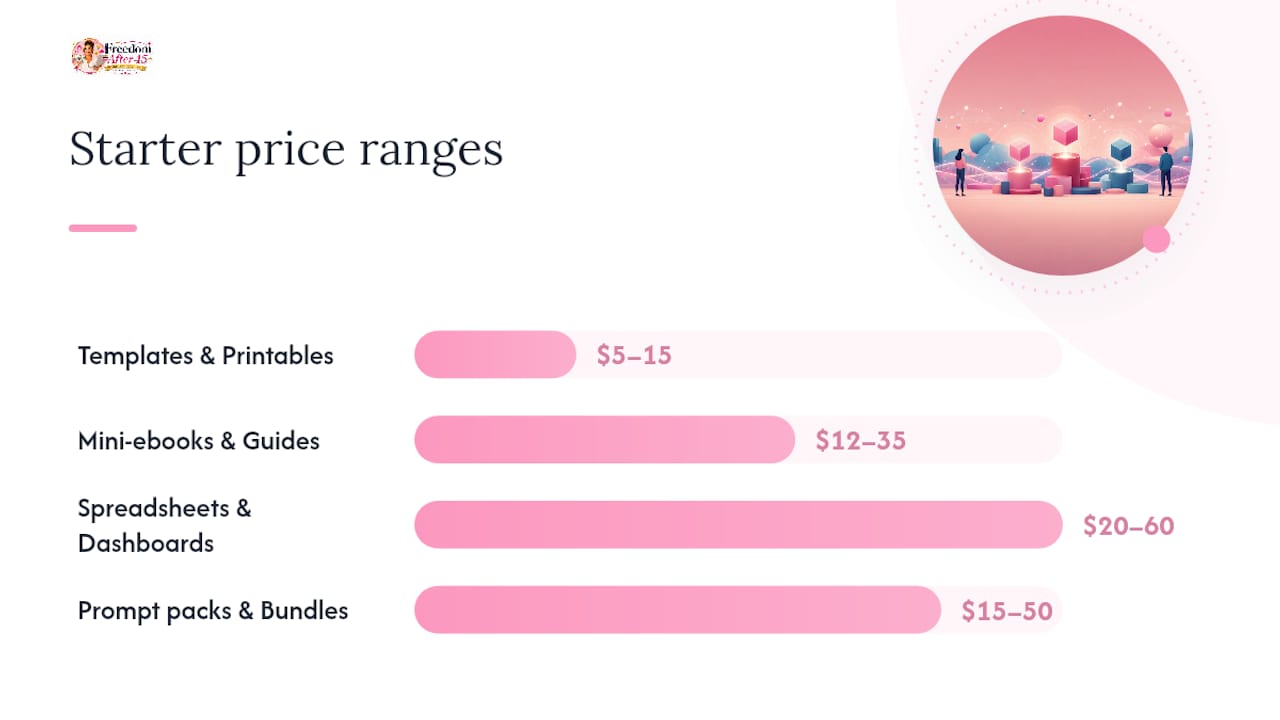
Starter ranges that tend to work for beginners:
- Simple templates and printables: $5 to $15
- Mini-ebooks and guides: $12 to $35
- Spreadsheet systems and dashboards: $20 to $60
- Prompt packs and bundles of multiple files: $15 to $50
Bundling is where the real money shows up. A single planner priced at $9 converts fine, but the same planner bundled with a companion worksheet and a short walkthrough video, sold as a “complete system,” tends to lift both conversion rate and average order value. Frame the bundle as a time-saver, not just “more files,” in your product copy.
Run small pricing experiments before you settle on a number. Offer an early-bird discount for the first week to reward early buyers and generate reviews fast. Or test a pay-what-you-want tier for a limited run to see what price your actual audience gravitates toward.
Pro Tip: List your bundle at a visibly “crossed out” higher price next to the real price. Buyers anchor on the discount, not the absolute number, and it’s one of the simplest conversion boosts you can make in five minutes.
How Do You Set Up Delivery So Files Arrive Automatically?
Getting paid is only half the job. The other half is making sure the buyer gets a working file instantly, without you lifting a finger at 11 p.m. on a Tuesday.
- Prep your files properly. Export templates as PDF for print-ready items, keep editable formats (Canva links, .docx, .xlsx) for anything the buyer will customize, and zip multi-file bundles so nothing gets lost in download folders.
- Choose secure hosting. Never email files manually. Use signed, time-limited download links with a cap on how many times a buyer can redownload, and version your files so updates don’t confuse someone who bought six months ago.
- Set up checkout. Whatever platform you choose, run a real test purchase with your own card before you announce the product publicly. Confirm the download link actually arrives, check your spam folder, and time how long the whole process takes.
- Check tax settings. If you’re on a merchant-of-record platform, confirm it’s actually collecting and remitting sales tax in the states or countries where you have obligations. If you’re on your own store, this is on you to configure.
- Set a refund policy before launch, not after your first complaint. Decide the rule now so you’re not improvising under pressure.
Reliable infrastructure here means secure file hosting, automated delivery links, working payment processing, and basic analytics so you can see what’s converting and what’s just getting clicks. Some course platforms, including Teachable, let you sell standalone downloads alongside course content, which is worth knowing if you ever plan to bundle a download with a paid course later.
What’s the 30-Day Plan to Land Your First Sale?
Most well-targeted digital products land a first sale within one to four weeks of a focused launch, not months. The gap between sellers who make that timeline and sellers who don’t usually comes down to whether they spent week one validating or week one perfecting.
Days 1 to 7: Validate and prep. Post about your idea where your audience already hangs out, whether that’s a Facebook group, an email list, or a subreddit. Open a simple pre-sell page or waitlist. Finish your first version of the product, keeping it intentionally small rather than comprehensive.
Days 8 to 14: Set up your selling channel. Pick one platform, either your owned store, a merchant-of-record tool, or a single marketplace listing. Resist the urge to be everywhere at once; splitting attention across four platforms in week two is how most beginners stall out. Write product copy that leads with the outcome, not the features. Run your test purchase.
Days 15 to 21: Soft launch. Announce to your warmest audience first, your email list, close friends, or your most engaged followers. If you’re marketplace-first, optimize your listing title and tags around the exact phrases buyers search, since marketplace discovery runs almost entirely on search terms, not browsing. Pin your listing image on Pinterest if it’s visual, since printables and templates travel well there.
Days 22 to 30: Public push and measure. Widen the announcement to broader social channels and any relevant communities. If you want to test paid traffic, keep it tiny, $5 to $10 a day, and track click-through rate, conversion rate, and cost per sale rather than judging by gut feeling. Kill anything that isn’t converting after a few days; don’t let a bad ad run on autopilot out of hope.
- Track email signups or waitlist joins from week one, that’s your leading indicator.
- Watch your listing’s click-through rate before you touch the price.
- Compare marketplace traffic against your own list traffic once you have both, since owned traffic tends to convert better over time.
Pro Tip: Send a personal, non-automated message to the first five people who buy and ask what almost stopped them from purchasing. That answer is worth more than a week of guessing at copy edits.
Where Does a Guided Workflow Fit In?
Everything above works whether you follow it alone with a spreadsheet of tasks, or inside a structured program that breaks the same decisions into short daily sessions. A 2-Hour Workflow can help those who have limited daily time and want a stepwise plan rather than a wall of options, preferring to follow a sequence rather than reinvent one.
The workflow maps closely onto the steps in this guide: pick a product, set up delivery, launch, in blocks short enough to fit around a full life. It suits people who learn best from a checklist rather than from piecing advice together across a dozen blog posts, and who want case studies and a community to check their thinking against instead of guessing alone.
Before committing money to any guided program, digital downloads included, ask whether it names a specific process (not just motivation), whether it fits the time you actually have free, and whether you can see what the day-to-day work looks like before you buy. A program is worth paying for when it saves you the weeks you’d otherwise spend testing platforms and pricing yourself.
What Legal Protections Cover Your Digital Products?
Your original templates, ebooks, printables, and designs are protected by copyright the moment you create them in a fixed, tangible form, no registration required in the United States, though formal registration with the U.S. Copyright Office gives you stronger legal standing if someone steals your work later. What copyright does not cover is an idea itself, only your specific expression of it, so someone can make their own budgeting spreadsheet without infringing on yours even if the concept overlaps.
Watch two areas closely. First, licensing terms: spell out in your product listing exactly what a buyer can do with the file (personal use, commercial use, resale rights) so there’s no ambiguity later. Second, source material: if you’re building templates using stock photos, fonts, or design elements from Canva or elsewhere, confirm the license actually permits commercial resale, since not every free asset does.
If someone pirates your file and reposts it elsewhere, most marketplaces and platforms have a formal takedown process modeled on the DMCA in the United States. Document the original file’s creation date and keep your source files as proof of ownership before you ever need them. This isn’t a reason to delay launching, just a reason to keep your receipts organized from day one.
How Do You Handle Refunds Without Losing Money or Trust?
Decide your refund policy before you list your first product, not after your first angry email. A clear, published policy actually reduces support headaches, because buyers who know the rules upfront rarely fight them, while an ambiguous policy invites every borderline request to become a negotiation.
For digital products, a common approach is a short window, often 7 to 14 days, and a requirement that the buyer describe what didn’t work rather than an automatic no-questions refund, since files can’t be “returned” the way physical goods can. Some sellers choose no-refund policies for very cheap items (under $10) and reserve formal refunds for higher-priced bundles, which is reasonable as long as it’s disclosed clearly before checkout, not discovered after.
When a refund request comes in, respond fast. A reply within a few hours, even a short one, defuses most frustration before it turns into a public complaint or a chargeback. Ask one clarifying question before automatically refunding, since sometimes the “problem” is a broken download link you can fix in thirty seconds rather than a genuine product issue. Track refund reasons in a simple note or spreadsheet. If the same complaint shows up three times, that’s not bad luck, that’s a signal to fix the product itself.
How Do You Scale Once the First Sales Come In?
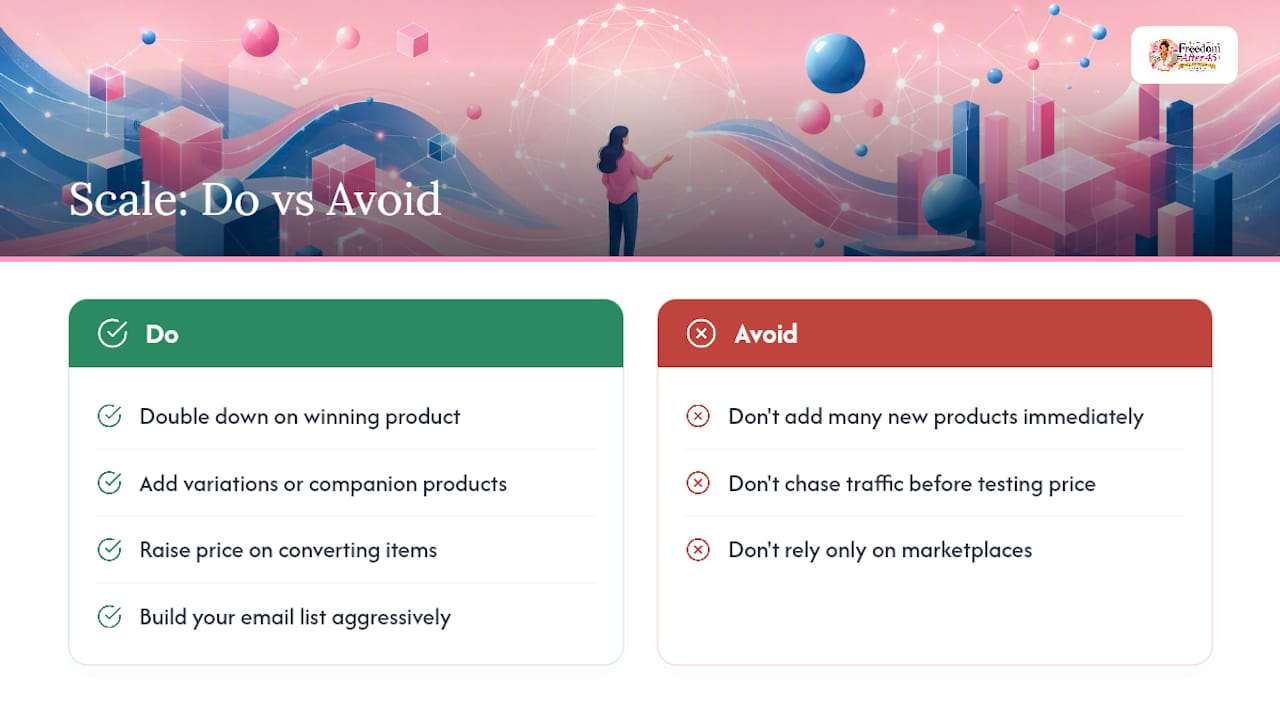
The jump from occasional sales to consistent sales usually comes from doing less, not more, once you know what’s working. Resist adding five new products the moment one succeeds. Instead, look at what’s already converting and go deeper on it: more variations of the same template, a companion product that pairs naturally with the original, or a bundle that combines your top two sellers.
Raise your price before you assume you need more traffic. A lot of beginners chase volume when a modest price increase on a product that’s already converting well would have solved the same revenue problem with zero extra marketing effort.
Build your email list aggressively once you have any paying customers, since repeat buyers are dramatically cheaper to sell to than new ones, and a store you own lets you email that list directly without a platform’s algorithm deciding who sees it. If you started on a marketplace, this is the point where migrating toward your own store starts to pay for itself, since you keep more of every sale once you’re not splitting revenue with a marketplace’s traffic toll.
Finally, look at seasonal timing. Planners sell hardest in December and January, wedding templates spike in spring, and tax-related spreadsheets move in Q1. Plan your bundle launches and price promotions around when your specific product category actually gets searched.
Editor Perspective: Common Beginner Mistakes and Quick Remedies
The biggest mistake isn’t picking the wrong platform, it’s building for three weeks before asking anyone if they’d pay. Validate first, always. The second mistake is spreading thin: one platform and one marketing channel, run properly, beats five run half-heartedly. And once you have any real audience at all, protect that relationship. Marketplaces are useful, but they don’t hand you the customer’s email address, and that’s the asset that actually compounds.
— Freedom After 45
Want a Guided Path Instead of Figuring It Out Alone?
Everything in this guide works as a solo project, but some people would rather follow a structured sequence than build their own roadmap from scratch. A 2-Hour Workflow offers structure: a step-by-step blueprint, video instructions, case studies, and a community working through the same process, all built around short, focused daily sessions instead of an overwhelming to-do list.

There’s no promise about specific earnings here, just a clear system for the same decisions this article walked through: what to sell, how to price it, how to get it in front of people. If your two hours a day feel more useful spent following a defined plan than testing platforms yourself, check out the 2-Hour Workflow and see whether the structure fits how you actually want to work.