

Search Merch for Creators: Fast Tool Workflow
The fastest way to search merch listings is to combine Merch on Demand’s native search with a Merch-focused scraper or extension for data depth, then finish with a reverse image lookup to catch visual matches and supplier signals. For most creators, that three-step sequence covers the majority of what you need before committing to a design.
Quick picks by use case:
- Quick check: Merch on Demand native search — free, instant, shows live listings
- Deep data: Merch Informer — paid, with a free trial, adds filters and listing metadata the native platform hides
- Merch-only filtering by market: Merch Search For Chrome extension — free, fast, US/UK/DE product type shortcuts
- Image-based discovery: searchbyimage.com — free, upload a screenshot and find matching listings across Amazon, AliExpress, and eBay
- Official/licensed browsing: Merchbar — curated licensed band and artist merch, useful as a trust-signal reference
Use the native platform first. Add a scraper when you need BSR context or historical listing data. Pull in image search when you spotted something on social media and want to trace it back to a supplier or find similar listings.
Table of Contents
- How does Merch by Amazon search actually work?
- What tools actually help you find merch listings?
- Advanced keyword and filter techniques that actually save time
- How reverse image search helps you find merch you spotted online
- How to read search results and spot a viable merch opportunity
- Key Takeaways
- The part most creators skip
- A repeatable daily income system for creators
How does Merch by Amazon search actually work?
Merch on Demand is Amazon’s print-on-demand platform where creators upload designs and Amazon handles printing, shipping, and customer service. When you search inside the platform or on Amazon’s public-facing storefront, the results show product types (Standard T-Shirt, Pullover Hoodie, PopSocket, and others), design mockups, titles, and price points. What you do not get publicly is full sales rank data or complete revenue figures per listing.
That limitation matters. You can see that a niche is crowded or sparse, but you cannot confirm exact sales velocity from the native search alone. Product type availability also varies by market: a design tier that unlocks the Pullover Hoodie in the US may not expose the same product in the UK or DE storefronts. Regional differences in product type availability are one of the most overlooked variables when creators browse merch online and assume a niche performs the same everywhere.
Pro Tip: When searching on Amazon’s public storefront, add “merch by amazon” as a phrase in your search query alongside your niche keyword. This surfaces a higher proportion of print-on-demand listings and reduces the noise from wholesale or private-label products that would otherwise crowd your results.
What tools actually help you find merch listings?
The table below covers the five tools creators use most, mapped to the scenarios where each earns its place.
| Tool | Primary purpose | Pricing | Data depth & filters | Market coverage | Ease of use |
|---|---|---|---|---|---|
| Merch on Demand (native) | Official listing browse and publish | Free | Basic: title, product type, mockup | US, UK, DE, others | Very easy; no setup |
| Merch Informer | Deep listing research and niche data | Paid; free trial available | High: clothing types, markets, listing metadata | US, UK, DE | Moderate; web dashboard |
| Merch Search For | Market-specific product type shortcuts | Free Chrome extension | Medium: product type and category filters per market | US, UK, DE | Very easy; one-click |
| searchbyimage.com | Reverse image and visual product search | Free | Visual match across Amazon, AliExpress, Alibaba, eBay | Global | Easy; upload or URL |
| Merch Search | Aggregator catalog by product vertical | Free | Medium: category browse, top-seller collections | US-focused | Easy; browse-first |
A paid tool like Merch Informer makes sense once you are validating niches at scale or need historical listing data to judge saturation. For a single quick idea check, the free extension plus a reverse image search gets you most of the signal in under five minutes.
AI-driven search tools are also worth knowing. Systems like Merch.ai’s search engine analyze intent by theme or event, apply color match scoring, and flag supplier availability in real time. That kind of curated, theme-aware discovery speeds up ideation considerably compared to raw keyword matching.
Advanced keyword and filter techniques that actually save time
A repeatable search workflow keeps your research consistent and cuts the time you spend chasing dead ends.
- Cross-check with the Merch Search For extension — One click surfaces market-specific product type searches without leaving your browser, so you can confirm what product types are active in each market before you invest design time.
- Run a reverse image check on the top three to five listings — Upload a screenshot to searchbyimage.com to see if the design is sourced from a stock art supplier or if it appears on AliExpress, which signals a potential licensing or originality issue.
Pro Tip: Combine a text keyword search with an image search on the same niche. If the image results return dozens of near-identical designs across multiple marketplaces, the niche is likely oversaturated or the art is generic stock. If results are sparse and varied, you may have found a gap worth filling.
How reverse image search helps you find merch you spotted online
Reverse image search is the fastest way to trace a design you saw on Instagram or TikTok back to its source listing or supplier. Upload a screenshot or paste an image URL into searchbyimage.com, and the tool scans Amazon, AliExpress, Alibaba, and eBay simultaneously for visual matches.
The practical uses go beyond just finding the same product:
- Spot licensing red flags — If a reverse search returns results tied to a recognizable brand, character, or logo, the design carries IP risk regardless of how the Merch listing is titled.
Large retailers are already moving in this direction. Disney World has tested in-app tools that let guests locate specific merchandise in real time, a signal that inventory-aware, image-driven discovery is becoming the standard expectation for merch shoppers and creators alike.
How to read search results and spot a viable merch opportunity
Not every populated niche is worth entering. Here is what to check before you commit design time:
- Official vs. unofficial listings — Platforms like Merchbar show what officially licensed band and artist merch looks like: curated, consistent, and clearly attributed. If your search returns listings that mimic a known brand’s aesthetic without clear licensing, that is a red flag for IP risk.
One sentence on copyright: if a design, phrase, or character appears in search results and is tied to a recognizable brand or public figure, assume it is protected until you have confirmed otherwise with a trademark search on the USPTO database.
Key Takeaways
The most effective way to search merch listings combines native platform search, a Merch-focused extension or scraper for metadata depth, and reverse image lookup to validate originality and demand signals.
| Point | Details |
|---|---|
| Start with native search | Use Merch on Demand with a specific two-to-three word seed keyword to get a fast first read on niche density. |
| Add a scraper for depth | Merch Informer’s free trial gives you listing metadata and filters the native platform does not expose publicly. |
| Use image search to validate | Upload top listing screenshots to searchbyimage.com to check for stock art, supplier overlap, or IP risk. |
| Watch for official vs. unofficial | Licensed shops like Merchbar set the trust standard; listings that mimic known brands without attribution carry real IP risk. |
| Freedom After 45 workflow | The 2-Hour Workflow at Freedom After 45 gives creators a repeatable, coached system for running this research process daily. |
The part most creators skip
Most creators treat merch research as a one-time task. They search a niche once, like what they see, and start designing. The problem is that a single search snapshot tells you almost nothing about trend direction or how quickly a niche is filling up.
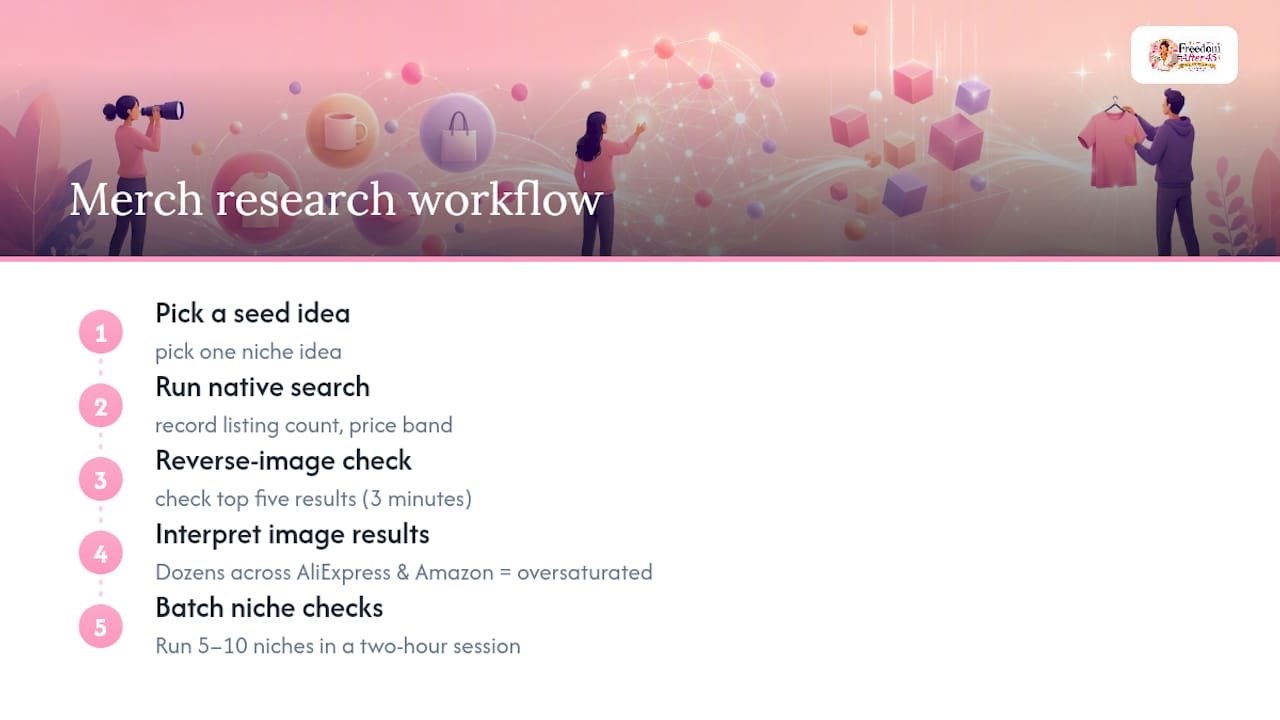
The workflow that actually holds up looks like this: pick a seed idea, run the native search, note the listing count and price band, then immediately run a reverse image check on the top five results. That second step takes three minutes and has saved countless hours of design work on niches that turned out to be flooded with stock art. If the image search returns dozens of near-identical designs across AliExpress and Amazon, the niche is either oversaturated or the art is generic enough that your version will not stand out.
Batching this process is where the real time savings come from. Run five to ten niche checks in a single two-hour session rather than one at a time across multiple days. You get a comparative view, which makes the viable niches obvious by contrast. A niche that looks thin in isolation looks like a clear opportunity when you have just checked nine others that are packed.
The AI-driven search tools that detect theme and event intent are genuinely useful here too, not because they replace keyword research, but because they surface adjacent ideas you would not have typed. Search “Father’s Day camping” and a theme-aware engine returns curated collections that show you what the market already offers, which is exactly the gap-spotting information you need before you open a design file.
A repeatable daily income system for creators
Researching merch listings is one piece of a larger income-generating workflow. If you want a coached, repeatable system that maps directly to the steps in this article, including templates, checklists, and video walkthroughs for each stage, the 2-Hour Workflow at Freedom After 45 is built for exactly that.

Freedom After 45 gives creators a structured daily process: two hours, a clear sequence, and a blueprint that removes the guesswork from deciding which niches to pursue and which to drop. The program includes the research framework covered here, plus the downstream steps for publishing, pricing, and scaling listings without needing an existing audience or product inventory. Thousands of women have used it to generate consistent daily income starting from zero. Visit earningdaily.net to see how the workflow runs and whether it fits your situation.