

PrettyMerch for Merch by Amazon: Seller's Guide
PrettyMerch is a free Chrome extension — with a paid Pro tier — that gives Merch by Amazon sellers a real-time dashboard, product manager, research suite, trademark checker, and sale notifications, all in one place. If you’re managing even a modest catalog on Merch by Amazon, it’s worth installing today. Over 50,000 sellers already use it, and the Chrome Web Store shows a 4.8 aggregate rating backed by 600+ five-star reviews. One thing to know upfront: your analytics live in your browser, not in the cloud, so clearing your cache or switching devices means planning ahead for backups.
At a glance:
- Free forever for core sales tracking, notifications, and basic product management
- Pro tier unlocks historical analytics, bulk actions for unlimited products, and the full research suite
- Data stays local to your browser or app — private by design, but requires manual backup steps
- Works for Merch by Amazon sellers in the United States and other supported marketplaces
- Best fit for daily sellers, catalog managers, and tier-seekers who want a 2-hour/day monitoring workflow
Freedom After 45 recommends pairing PrettyMerch with a structured daily routine to turn those analytics into consistent income.
Table of Contents
- What does PrettyMerch actually do? A feature-by-feature map
- How the dashboard and analytics help you make better daily decisions
- How the product manager handles large catalogs efficiently
- What the product research suite can find — and where it stops
- What the trademark search does and why you still need USPTO TESS
- Notifications, earnings reports, and staying on top of sales daily
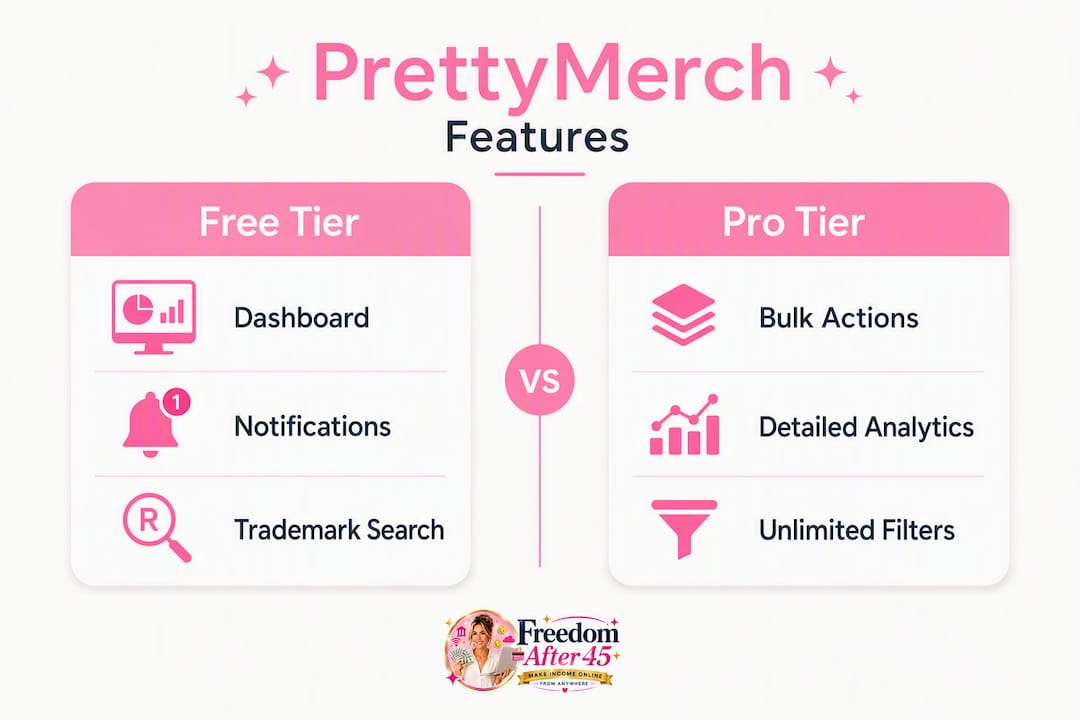
- Free vs. Pro: what each tier actually gives you
- Data privacy and what local storage means for your backups
- How to install PrettyMerch and build a practical daily routine
- Key Takeaways
- Why the tool is only half the equation
- The workflow that turns PrettyMerch data into daily income
- Useful sources
What does PrettyMerch actually do? A feature-by-feature map
PrettyMerch covers seven distinct capability areas. Here’s what each one does and where it lives:
| Feature | What It Does | Free or Pro |
|---|---|---|
| Dashboard | Real-time sales summary, royalties, top sellers | Free |
| Advanced Analytics | Historical breakdowns, trend charts, extended date ranges | Pro |
| Product Manager | Filter, bulk edit, bulk delete across your catalog | Free (limited) / Pro (unlimited) |
| Product Research | BSR filters, trend finder, new-design detection | Pro |
| Trademark Search | Instant check against registered and filed marks, including international/EU | Free |
| Notifications | Cha-Ching sale alerts, tier-up alerts, logged-out warnings | Free |
| Earnings Report | Daily/weekly/monthly royalty summaries with chart drilldowns | Free |
The extension runs inside Chrome and connects directly to your Merch by Amazon account. A companion iOS app (PrettyMerch 4+ on the App Store, developed by MerchCoders Ltd) mirrors the dashboard for mobile monitoring. Most sellers start with the free tier to validate the workflow, then upgrade to Pro once catalog size or the need for historical data makes the subscription cost obvious.
How the dashboard and analytics help you make better daily decisions
The dashboard updates in real time. The moment a sale hits, you see it — units, royalties, and a running total for today, this week, and this month. The “Top 30 Day Sellers” widget ranks your designs by units and royalties, which is the fastest way to spot what’s actually moving versus what you uploaded and forgot.

Charts show sales by day and let you click individual bars to drill into which products sold on that date. That click-through is more useful than it sounds: when you see a spike on a Tuesday, you can trace it to a specific design and decide whether to raise the price or push similar styles.
Key metrics sellers watch daily:
- Today’s units and royalties vs. the prior 7-day average
- Top 30 sellers ranked by royalties (not just units — margin matters)
- BSR signals on individual products to gauge momentum
- Any sudden drop in a previously consistent seller (often signals a listing issue or removal)
Trust signals at a glance:
| Signal | Value |
|---|---|
| Claimed user base | 50,000+ Merch sellers |
| Five-star reviews | 600+ noted on product pages |
| Chrome Web Store rating | 4.8 aggregate |
Pro Tip: Set a 10-minute morning check of the dashboard before doing anything else. A sudden zero-sales day on a design that normally moves 2–3 units is often the first sign of a listing removal — catching it early saves you from days of lost visibility.
How the product manager handles large catalogs efficiently
The product manager is where PrettyMerch earns its keep for sellers with hundreds or thousands of designs. You can filter your entire catalog by Title, Brand, Bullets, Description, ASIN, Reviews, BSR, Availability, Units Sold, Royalties, Date Created, Last Updated, and Price. That’s not a generic search bar — it’s a proper triage tool.

Bulk actions let you update prices across a filtered selection, delete removed or underperforming ASINs in one pass, and clear out products that no longer exist in Amazon’s system. The free tier caps how many products you can manage this way; Pro removes that ceiling entirely.
A practical example: say you have 100 designs priced at $19.99 that haven’t sold in 90 days. Filter by “Units Sold = 0” and “Date Created before [90 days ago],” select all, and bulk-update to $14.99 to test price sensitivity. That workflow takes about 10 minutes in PrettyMerch versus hours of manual edits inside Merch by Amazon’s native interface.
One edge case worth knowing: ASINs that Amazon has fully removed sometimes still appear in the product manager until you manually clear them. Running a monthly cleanup pass keeps your catalog view accurate.
What the product research suite can find — and where it stops
PrettyMerch’s research tool filters Amazon search results by BSR, sales velocity, and other signals to surface trending designs and new styles before they’re saturated. The database updates regularly and covers millions of products, so you’re working with reasonably current data rather than a static snapshot.
Realistic applications:
- Trend finder: Spot rising design styles by filtering for low BSR + recent upload date
- BSR filters: Shortlist products in a niche to gauge demand before committing a design slot
- Product analyzer: Drill into a specific design’s performance signals to decide whether a similar concept is worth testing
- New-design detection: Flag recently listed products gaining traction before the broader seller community notices
The limit is real and worth stating plainly: PrettyMerch organizes and monitors Amazon search results — it doesn’t predict demand or replace structured market research. Use it to generate ideas and shortlist test uploads, not to guarantee a bestseller. Pair it with your own niche knowledge and low-risk upload strategies for the best results.
What the trademark search does and why you still need USPTO TESS
PrettyMerch’s trademark search indexes registered and filed trademarks across available marketplaces, including international and EU records. Run a phrase before you upload and you’ll catch the obvious conflicts — the kind that get designs pulled within hours of going live.
Because analytics stay local to your device, your trademark searches aren’t transmitted to third-party servers either — a meaningful privacy advantage for high-volume sellers who don’t want their research patterns exposed.
After any positive hit, follow this checklist before proceeding:
- Run the same phrase in USPTO TESS directly
- Check for common-law marks (unregistered but actively enforced brands)
- Adjust the design concept to avoid the flagged term entirely
- If the design has significant commercial potential, consult IP counsel before uploading
The trademark search is fast and genuinely useful for filtering obvious infringements. Treat it as the first filter, not the final word.
Notifications, earnings reports, and staying on top of sales daily
Sale alerts fire in real time with a distinctive “Cha-Ching” sound the moment a transaction processes. Beyond that, you get tier-up alerts when you’re approaching the next Merch tier, account message notifications, and logged-out warnings so you don’t miss data while Amazon has ended your session.
Earnings surface as daily, weekly, and monthly royalty summaries with chart drilldowns by product. The practical use: when a design spikes on a specific day, you can trace the royalty back to the product and decide whether to raise the price or create variations.
Recommended notification settings for a 2-hour/day workflow:
- Enable Cha-Ching alerts on desktop during your active work window
- Turn on tier-up notifications so you never miss a tier advancement
- Keep the logged-out alert active — losing session data mid-day is a common frustration
- On mobile, allow background app refresh so the iOS app can push alerts when Chrome is closed
One technical caveat that catches sellers off guard: alerts require the extension to be active or the app running. A closed browser or strict battery-saver mode on your phone will block real-time notifications. If you’re doing a focused 2-hour session, keep a Chrome tab open with the extension active for the full window.
Free vs. Pro: what each tier actually gives you
The free tier is genuinely functional, not a stripped demo. Here’s what you get without paying:
- Real-time dashboard with today/week/month sales summaries
- Cha-Ching sale notifications and tier-up alerts
- Trademark search (instant, with international/EU coverage)
- Basic product manager with filter access (product count limits apply)
- Earnings report with daily and weekly royalty views
Pro unlocks the features that matter at scale:
- Extended historical analytics across custom date ranges
- Unlimited product manager (no catalog size cap)
- Full research suite with trend finder and BSR filters
- One-click analytics widgets and auto re-login
- Bulk price updates and bulk delete across the full catalog
When to upgrade — a short decision checklist:
- Your catalog exceeds the free tier’s product manager limit
- You need historical data to spot seasonal patterns or long-term trends
- Bulk repricing or cleanup would save you more time per week than the subscription costs
- You’re actively using the research suite to find new niches
For most sellers starting out, the free tier is enough to validate whether the workflow fits. Upgrade when the time savings become measurable.
Data privacy and what local storage means for your backups
PrettyMerch stores your analytics in your browser’s local cache or app memory — not on PrettyMerch’s servers. That’s a genuine privacy advantage: your sales data, research queries, and trademark searches stay on your device.
The trade-off is equally real. Clear your browser cache, uninstall the extension, or switch to a new computer, and your historical data is gone. Multi-device sync isn’t automatic unless the app supports local database export and import.
Pro Tip: Before clearing your cache for any reason, export or screenshot your key analytics. If the app supports a local DB export, run it weekly and store the file somewhere outside your browser — a cloud folder or external drive works fine.
Security trade-off summary: better privacy and no third-party data exposure, but no built-in cloud backup or central account recovery. Plan your backup routine before you accumulate months of historical data you’d regret losing.
How to install PrettyMerch and build a practical daily routine
Install and connect (5 steps):
- Search “PrettyMerch” in the Chrome Web Store and click “Add to Chrome”
- Log in to your Merch by Amazon account in the same browser session
- Grant the extension the permissions it requests to read your Merch dashboard
- Confirm the dashboard populates with your sales data (may take a few minutes on first load)
- Enable Cha-Ching notifications and set your alert preferences
A 2-hour daily workflow:
- 0–15 min: Check alerts from overnight, review today’s sales summary, flag any zero-sales anomalies
- 15–45 min: Scan Top 30 sellers, note BSR changes, and adjust prices on slow movers
- 45–90 min: Run 1–2 research queries for new design ideas, shortlist test uploads
- 90–120 min: Run any bulk edits needed, perform a trademark check on new concepts, and export or back up analytics if it’s your scheduled backup day
Common install issues and fast fixes:
- Cha-Ching not firing: confirm the extension is active and a Chrome tab is open
- Dashboard not populating: log out of Merch by Amazon and log back in with the extension active
- Mobile alerts missing: check that background app refresh is enabled for the PrettyMerch iOS app
First-week setup checklist:
- Verify historical data is capturing correctly after 24 hours
- Set notification preferences for both desktop and mobile
- Run a test trademark search on one of your existing designs
- Schedule your first weekly analytics backup
Key Takeaways
PrettyMerch is the most practical free tool available for Merch by Amazon sellers who want real-time sales visibility, catalog control, and trademark screening without paying upfront.
| Point | Details |
|---|---|
| Free tier is genuinely useful | Core dashboard, notifications, trademark search, and basic product manager work without a subscription. |
| Pro pays off at scale | Upgrade when catalog size or need for historical analytics creates measurable time savings. |
| Local storage protects privacy | Analytics stay on your device, but clearing cache or switching computers removes historical data permanently. |
| Daily workflow is the multiplier | A structured 2-hour routine converts PrettyMerch’s signals into consistent repricing, research, and upload decisions. |
| Freedom After 45 pairs well here | The Freedom After 45 2-hour workflow blueprint gives sellers the repeatable process that turns PrettyMerch data into daily income. |
Why the tool is only half the equation
PrettyMerch surfaces the signals. What most sellers underestimate is how much the response to those signals matters. A Cha-Ching alert tells you a design sold. It doesn’t tell you whether to raise the price by $2, create three color variations, or push a similar concept into a new niche. That decision layer is where most sellers stall.
The sellers who tier up fastest aren’t the ones with the most data. They’re the ones with a repeatable process for acting on it. PrettyMerch compresses the feedback loop — you see what sold, when, and at what royalty — but without a structured daily routine, that information sits unused. The tool is genuinely good at what it does. The gap is almost always on the workflow side, not the data side.
For Freedom After 45 readers, this is the exact problem the 2-hour workflow addresses: not more data, but a disciplined sequence for turning what the data shows into uploads, price changes, and catalog decisions that compound over time.
The workflow that turns PrettyMerch data into daily income
PrettyMerch tells you what’s selling. The Freedom After 45 2-hour workflow tells you what to do about it — step by step, without guesswork or wasted hours.

The workflow blueprint pairs directly with tools like PrettyMerch: you check your dashboard, act on the signals, and move on. No spiraling into research rabbit holes, no staring at data without a next step. The paid program adds structured routines, fill-in templates, case studies from real sellers, and a community where you can ask questions when the data doesn’t make sense.
If you’re already using PrettyMerch and want a proven system for converting those analytics into $100–$1,400 in daily royalties, the blueprint at earningdaily.net is the logical next step.
Useful sources
- PrettyMerch official homepage — features overview, pricing model, claimed user base, and privacy approach
- PrettyMerch on the Chrome Web Store — install page, aggregate rating, product manager filter list, notification behavior, and trademark search scope
- PrettyMerch on the Apple App Store — iOS app details, developer (MerchCoders Ltd), and mobile dashboard features
- USPTO TESS trademark search — official U.S. trademark database for final clearance verification after any PrettyMerch trademark hit